
Make an audiobook preview by preparing a short, representative excerpt and exporting it as its own audio file. If you already have narration, select the passage in an audio editor and export only that range. The useful result is a file you can replay and compare with the PDF before committing to the full document.
The workflows below come from ElevenLabs Audiobooks and Audacity documentation reviewed on 6 November 2026. No sample was generated or listening-tested for this guide. The review checklist is a method you can apply to your own recording.
Choose an excerpt that reveals likely problems
Choose a passage that includes the things your final recording must handle: a person or place name, a number, a long sentence, a paragraph break and, where relevant, dialogue. A clean introductory paragraph may sound convincing while hiding the problems elsewhere in a book.
Keep complete sentences on both sides of the selection. For a technical PDF, include an abbreviation, a citation and a sentence near a column or page boundary. For fiction, include a change of speaker and surrounding narration. If these appear far apart, make two separate samples rather than joining unrelated sentences into a misleading passage.
For private voice selection, there is no single duration required by the workflows here. Pick enough text to expose the risks you care about. For a public sample, first establish permission to share the passage and the voice output. A private rehearsal does not establish distribution rights.
Prepare the text and voice
Compare the selected text with the PDF. Rejoin words split only by line wrapping, remove repeated headers that interrupt sentences, and preserve numbers, units and meaning. Keep a copy of the original excerpt so that editorial changes remain visible. Use the OCR workflow if the page is a scan.
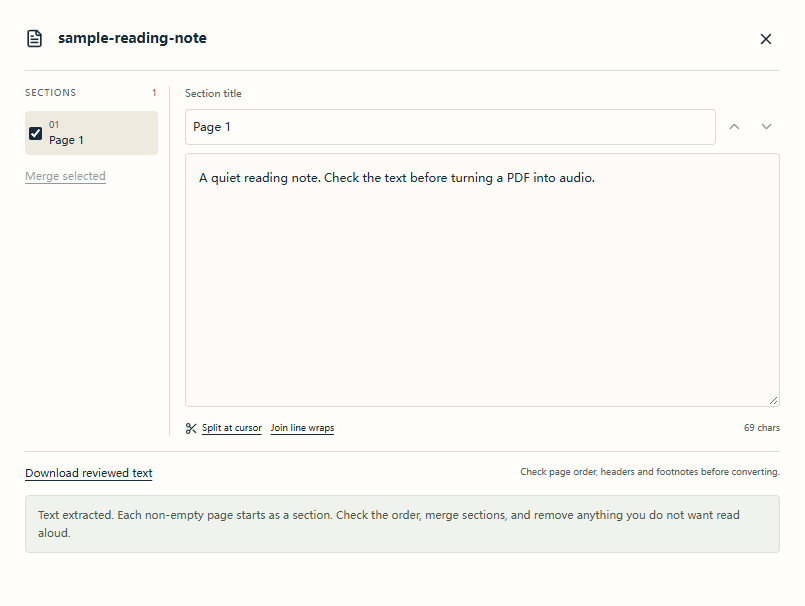
The converter shows extracted words in an editable section. Compare your excerpt with the source PDF before requesting a voice preview.
You have text but no audio yet
In ElevenLabs Audiobooks, a documented route is:
- Create a separate audiobook project containing only the excerpt. You can paste the prepared manuscript or upload a document; isolating the sample avoids accidentally generating the rest of the book.
- Choose Single cast for one narrator, or set up the required character voices if that is part of the planned production. Review the parsed sections and voice assignments.
- Choose the model, voice and pronunciation settings you intend to use later. Generate the sample paragraphs and listen in context.
- To save the result, open Publish, switch to Export, choose Audio, select the intended scope and export MP3 or WAV. Reopen the downloaded file outside the editor.
Custom voice previews and new narration can use credits. Export can also generate unfinished sections. Do not assume that clicking Play, Preview or Export is free; confirm the selected range and allowance before proceeding. A sample-only project makes the scope easier to inspect.
You already have a longer recording
With Audacity's Export Audio dialog:
- Open the recording and select the passage on the timeline. Listen across both selection boundaries to avoid clipping a word.
- Check which tracks are selected. Audacity's documented current-selection export includes the selected tracks, so verify the result rather than assuming the mute state settles every export choice.
- Choose File → Export Audio, set the filename, destination and format, and select Current Selection as the range.
- Check the start and end of the selection again, then export. With no active selection, Audacity may offer the entire project instead.
- Open the saved file in a separate player and confirm that it contains only the intended excerpt.
Keep the longer original recording unchanged so you can choose a different sample later.
Evaluate pronunciation, pace and omissions
Listen once without looking at the text, then listen while following the source. The first pass tests whether the excerpt is understandable; the second catches errors a smooth voice can conceal.
| Check | What to listen for | Reason to revise |
|---|---|---|
| Pronunciation | Names, abbreviations, numbers and units in their sentence. | A word sounds plausible but changes the intended term or amount. |
| Pace and pauses | Sentence ends, dialogue turns and paragraph transitions. | A pause breaks a phrase or a speaker change becomes unclear. |
| Completeness | The first and last words, plus a line-by-line comparison. | Missing, repeated or reordered text, including a dropped negative. |
| File boundaries | Opening, ending, silence and selected track content. | A cut-off word, unexpected track or the whole book in the sample. |
Change one cause at a time: text order, pronunciation, voice or pace. Save the corrected text and export a fresh sample after regeneration. An old download does not demonstrate that an editor change reached the audio. ElevenLabs' editing guidance specifically distinguishes changing settings from regenerating existing paragraphs.
Move from preview to the full document
Record the exact voice, model, language, speed, pronunciation rules and export format used in the accepted sample. Then inspect the full document's text and chapter structure. A successful excerpt checks those conditions for that excerpt; it cannot prove that later tables, dialogue or unusual terms will work.
Review the full-run estimate and available allowance, including any regeneration you expect. Generate a manageable chapter first, inspect it, and preserve completed audio before continuing. For a wider choice of workflows, compare the documented PDF-to-audiobook options.
If the preview is for ACX, use its separate submission rules. The ACX requirements, reviewed on 6 November 2026, cap the retail sample at five minutes and require it to come from the audiobook. They also require human narration unless separately authorized. An AI voice test therefore does not establish eligibility for ACX submission; private review and retail approval are different steps.
Use the workspace to prepare a short passage and see if a voice preview is available. A preview uses character allowance; the pricing page lists the trial conditions.